This guide describes how the accounting data must be exported from BMD as a trial balance (“SuSa”) so that they can be imported into Finokapi as a basis for your financial planning & analysis.
Please note that a SuSa file always relates to an entire fiscal year. We recommend that you take into account at least 2 previous years when exporting for the first time and create a new export every month for the current fiscal year.
No access to BMD? Simply forward the link to this guide to your tax advisor.
Schritt 1: Open the trial balance in BMD
Please complete the following steps to create the SuSa files in the appropriate format for Finokapi:
In BMD, open the "FIBU" module.
Click "Auswertungen" -> "Ausdruck Saldenliste".
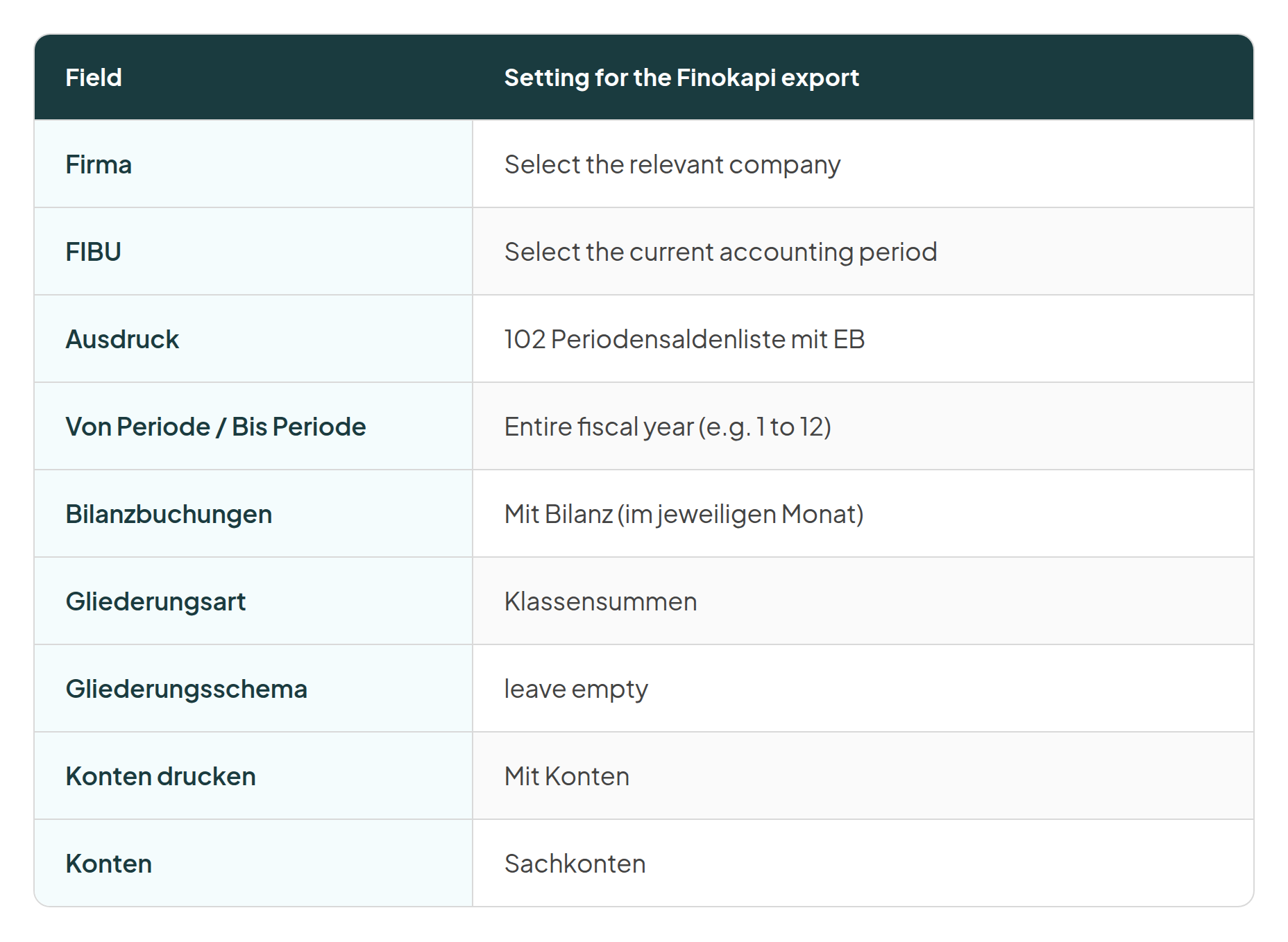
Schritt 2: Set the export options
Apply the following settings in the dialog:
Schritt 3: Save the SuSa file
In the header bar, click "Excel Export" and save the file locally.
Repeat steps 2 and 3 for every additional fiscal year you want to import into Finokapi.


.png)